

As digital platforms continue to evolve, so too must the systems and software that power them. For businesses using Umbraco, it’s essential to stay on top of support timelines to ensure your website is secure, efficient, and future-proof. Running on an outdated version of Umbraco might seem harmless, but it exposes your website to unnecessary risks, especially as these older versions approach or reach their End of Life (EOL).
Here at Gecko, we understand that upgrading your CMS can feel like a daunting task, especially if everything seems to be running fine on an older version. However, once a version of Umbraco reaches EOL, it’s no longer maintained or supported, leaving your website vulnerable to security breaches, performance issues, and compatibility problems. Without timely upgrades, you could be facing bigger headaches down the road, from unfixable bugs to complete rebuilds.
So, why is it so important to stay ahead of these dates? And how do you know when it's time to start planning your upgrade? This blog outlines the Umbraco support end dates for each version, helping you identify where your site stands and when action is needed. Whether you’re on Umbraco 7, 8, 9 or another version, our aim is to provide you with all the information you need to make informed decisions about your website’s future.
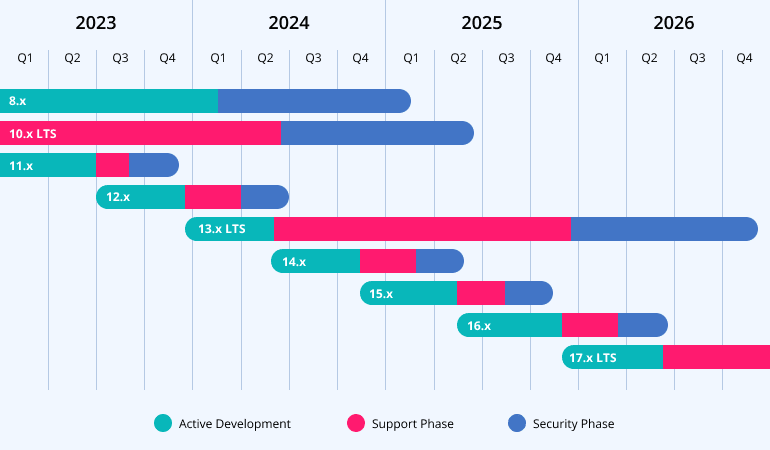
Here is the current list of Umbraco versions and their corresponding end-of-life (EOL) dates:
- Umbraco 7: Reached EOL in September 2023.
- Umbraco 8: EOL set for February 2025, with the possibility of extended support for security patches.
- Umbraco 9: Reached EOL in December 2022.
- Umbraco 10: EOL is scheduled for June 2025.
- Umbraco 11: Will reach EOL in December 2023.
- Umbraco 12: EOL set for June 2024.
- Umbraco 13: EOL anticipated in 2026.
Why You Need to Upgrade
“Once a version reaches end of life, it’s essentially a dead product. There’s no more support, no security patches, nothing. So, it’s strongly recommended that you upgrade before that point. If your website runs on an older version of Umbraco, you’re taking on significant risks.”
LTS Versions and Upgrade Planning
“We suggest sticking to LTS versions to ensure your site has full support and security coverage. While there are always new features with incremental versions, for most clients, the LTS versions are the best option for maintaining stability and security. But if you’re keen to take advantage of new functionalities sooner, an incremental upgrade plan could be worth considering.”
Skipping Short-Term Versions
For most of our clients, focusing on LTS releases makes the most sense for maintaining stability and reducing upgrade frequency. However, if there’s a specific feature you want from a short-term version, we can absolutely help you plan a strategy that ensures you get the most out of it - while keeping future upgrade paths smooth and manageable.
Stay Secure, Stay Supported
Ultimately, upgrading to a supported version of Umbraco is the most effective way to protect your website and take advantage of new features. Running on an EOL version comes with risks, and while temporary solutions like penetration testing or limiting access via IPs can offer short-term relief, they are costly and not as effective as a full upgrade.
If you're unsure about your current Umbraco version's status or need advice on the best upgrade path, get in touch with us today. We'll help you ensure that your website stays secure, supported, and future-proof.
By keeping an eye on these EOL dates, and working with Umbraco experts like us, you can plan your upgrades with confidence, knowing that your website will remain secure and up to date with the latest features.
Frequently Asked Questions (FAQs)
- Support Phase: Lasts 9 months from the first release, extended to 24 months for LTS (Long-Term Support) versions. During this phase, Umbraco addresses bugs, regressions, and security issues. This is the safest time to upgrade as your site will benefit from these fixes.
- Security Phase: After the Support phase, the version enters a Security phase, lasting 3 months (or 12 months for LTS versions). During this time, only critical security issues are resolved. Once the Security phase ends, the version reaches End of Life (EOL) and is no longer supported.
Patches are usually applied to the latest minor release of a major version. This means if you’re not on the latest version of your current major release, you might miss important fixes. Critical security patches, however, may be backported to older minor releases if necessary. This makes it important to upgrade regularly, even within the same major version, to stay protected.
- Umbraco 13 LTS supports .NET 8 LTS, and
- the upcoming Umbraco 17 LTS will align with .NET 10 LTS.
- From July 2021, new projects or baseline children cannot be created based on Umbraco 7.
- Umbraco 8 will follow the same policy 24 months after its last minor release, which was in February 2022.
Umbraco Forms, Commerce, Workflow, and Deploy follow the same LTS and EOL policies as the core Umbraco CMS. This consistency ensures that when you upgrade the CMS, all related components are fully supported, making it easier to plan upgrades without unexpected compatibility issues.
Vendr has been rebranded as Umbraco Commerce and is now fully supported by Umbraco HQ. If you’re using an older version of Vendr, consider upgrading to Umbraco Commerce to benefit from ongoing support. Vendr 3 will reach EOL on June 29, 2024, so it’s worth planning ahead to make this switch.
- Courier: Reached EOL in March 2022. It has been replaced by Deploy On-premises for Umbraco 8 and 9+ versions.
- Contour: The predecessor to Umbraco Forms, Contour 3, was released in 2012 and is considered EOL.
- Umbraco Heartcore: Automatically upgraded, so there is no LTS or EOL policy.
- Umbraco Uno: This product has been discontinued, and all projects have been transitioned to Umbraco Cloud running on Umbraco 8.18, following the LTS and EOL policy for that version.